Looking for Connect2? Visit the new website at www.connect2software.com

NETLOAN CASE STUDIES

Experiences, stories and feedback from our customers

Major library projects and Netloan

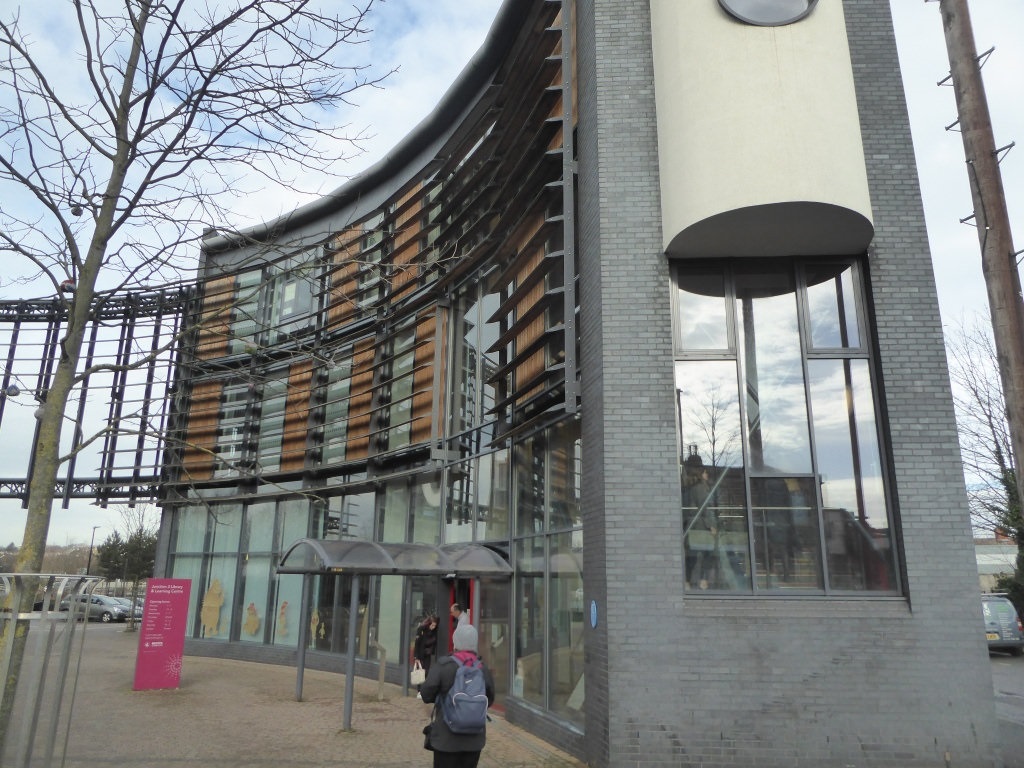
This review explores a number of recent major library projects involving Lorensbergs’ Netloan PC booking software customers. Following these projects, use of library services has increased in response to the modern and inviting facilities provided. They have also created some inspiring new urban landmarks. In each case, the digital offer developed and provided by these libraries is a core part of services – an essential element that we are committed to supporting and developing through our Netloan portfolio. The review is available to download here.   The following libraries are included: The Word, Tyneside Halifax Central Library, Calderdale Limelight, Trafford Storyhouse, Chester Manchester Central Library Stafford Central Library, Staffordshire Watford Central Library, Herts Beeston Library, Nottinghamshire Dunfermline Carnegie Library, Fife Oxford Central Library The Curve, Slough The Library of Birmingham Library at Willesden Green, Brent   Photo credit: Julia Chandler/Libraries Taskforce
Discover More

A Career in Review with Catherine Cooke at Westminster Libraries

Catherine Cooke is a Systems Officer at Westminster and Kensington and Chelsea Bi-borough Libraries. Lorensbergs talked to Catherine about her long career as a librarian, how she’s seen technology enable better library services, and her experiences as a long-term Netloan customer. Over your time working at Westminster and Bi-borough libraries, what’s inspired and motivated you most? My career has brought me a lot of satisfaction over the years. I used to be a lending and reference librarian before becoming a systems librarian. So I’ve always felt that I’m not just doing this for the sake of the IT. It’s about knowing what the IT is supporting, the services you’re providing and how much users rely on them; making sure library PCs and printers are working as well as possible for these reasons. Technology is there to serve us, even though sometimes it can be trying! The right innovations can really improve library services, bring vital automation where needed and make them easier to support. Why are the People’s Network and library printing services important? Westminster Libraries has always placed importance on offering PCs to the public, and this actually pre-dates the People’s Network by a few years. It’s an important service as it enables people to access resources they might not otherwise be able to afford. So even if you have a PC and internet access at home, it’s still of benefit to come to the library and use digital newspapers or Ancestry.com or use one of our business databases. You can save documents to a memory stick from library computers, but often people prefer to take away a hard copy. So printing is an important service too when using these subscription databases. And of course we support those that don’t have computers and printers at home. Printing continues to be popular with a lot of people; even if they have a device, they often can’t print. Jobseekers use library PCs to produce and print CVs for example. During lockdown, we had a couple of libraries open in the north and south of the borough, so we could offer PC access to vulnerable residents. It’s not something that everyone realises, but Westminster and Kensington have pockets of deprivation that need this support. So it’s been important that libraries allowed them to access online services during lockdown and also afterwards – the need for public PC use is still there. Libraries are the approachable face of the council. People prefer to walk into a library and get help using a PC to access digital council services rather than visiting ‘the Council’ at Westminster City Hall. Our councillors are very pro-libraries and very supportive of our services. They were keen for us to keep a presence over lockdown so residents could continue accessing PCs. Our library senior management has always worked with our councillors so they’ve seen the success of libraries and how much they are able to help people. Our weekly IT help sessions are funded by the Abbey Road and Regents Park ward councillors. Above: Catherine trying out RFID equipment at Marylebone Library; Top of page: Mayfair Library where Catherine began her career. Why is Netloan important in supporting PC and printing access in your libraries? As a PC booking solution, Netloan has saved a lot of arguments over the years! The People’s Network is so important to the people that rely on it, so access needs to be managed fairly. With Netloan taking care of how long people have and when they need to log off, there’s no disagreement over which clock or watch is correct. So it saves staff from needing to intervene and it definitely ensures a much simpler, smoother system! People also use Netloan to book ahead. They might have a routine of booking from one week to the next, and come in after work to use the same computer every week. A lot of people just walk in and log in when needed, but the booking functionality continues to be really important. We have a link to the booking portal from our library app. So people know when they come in what they want is going to be available to them. For some, getting on a library PC is an important aspect of their leisure time. For others, it’s to do with the research they’re carrying out and they might need to use the PC in conjunction with the hard copy resources in the library. Or they might need PC access to keep up with family and friends. At Pimlico, the library is integrated with the local schools. Children use the computers and printers a lot for their homework. A couple of our libraries have got learning centres and we use Netloan to book out those PCs for the groups that come in. The IT help sessions support mostly older people to get to grips with computers and we also have homework clubs that use our PCs.   How have self-service kiosks supported delivery of library services? Self-service is one of the ways we want to go as we want to encourage people to do things for themselves. It also helps continue the reduction of cash handling which reduces our costs. We refreshed our kiosks during the pandemic and introduced card payments which was a major advantage. It reduced the customer to staff interaction which has been a necessity at this time. It also made it possible to stop handling cash. We have enquiry points rather than traditional staff desks now, allowing staff to do more floor walking and showing customers how to use self-service to issue books, book PCs and release their printing. This way staff can spend more time organising the stock, creating displays, and other tasks which benefit the whole library. It releases them from too many routine transactions. So staff like the kiosks as they allow them to do more interesting work. The customers find it really easy to use the kiosks. They reduce queues and generally save them time. We have some unusual usage patterns at Westminster with lunchtimes being extremely busy between 12 and 2pm. People come out of their offices and head for the library in their lunch hours. Some of our branches are near major train stations like Charing Cross and commuters nip back in after work so we have another peak at that time. The kiosks really help here and stop commuters from getting held up.   How have you found working with Lorensbergs as a Netloan customer? Working with Lorensbergs has gone very well. Your software works well. Your direction of travel is always the right way: you do the market research and know what the development requirements are for libraries. The Lorensbergs’ support desk is extremely good, it’s very responsive, explaining what’s needed and fixing problems quickly. When you’ve come on site for new installation work it’s gone very well with good training provided. And now you’ve got remote access for upgrade work which is a further improvement. We’ve been very happy with the Netloan software. It’s the ease with which PC booking happens, how people get their sessions. And also the ease of printing if people want to. It’s a single sign-on solution, all users need is their library card number and PIN and they’re logged into the PC. People can also book ahead using their Netloan account – if they’re on the way to the library on the train, they can make their booking and the computer is available for them to use when they arrive. The Lorensbergs’ partnership with Bibliotheca has been a driver for how we’ve organised things. It was important that customers could book PCs and print documents for themselves, so we really wanted to have these services integrated on our kiosks. The Netloan integration has kept customers happy by enabling them to help themselves without needing to go to staff.   What value have the Netloan user groups provided? I’m a great believer in the user groups. You get to talk to other Netloan customers about what they’re doing and hear about their experiences. You can compare notes on best ways to understand and address issues. Above: Catherine (8th from left in red) at the London & SE Netloan User Group 2014 at the Idea Store in Canary Wharf Hearing from and talking to the people who develop the software is also invaluable. You get a refresh on what’s come out in recent releases and what’s coming up which really helps with your own library’s plans. And you can approach Netloan staff to discuss and help resolve any issues you might be having.   What do you predict for the future of the People’s Network? It’s going to continue as it gives access to resources not everyone can afford. It’s not just about the computers but also the subscriptions libraries offer access to. You can’t get this depth or accuracy with sources like Wikipedia, and the way the internet is developing you often have to pay to read quality reference resources. Or you can access them for free at the library. Although phones are getting bigger you can’t do everything on them. You wouldn’t be able to produce a CV and it would be difficult to do this even on a tablet. And laptops tend to be expensive. Those who are jobseeking and needing to make applications and produce CVs are less likely to have access to PCs and laptops. Or they may want to do some research on a potential employer. I once directed a friend to the reference library at Westminster to look at certain business directories and do some research and he got the job! He’s always said it was because he was able to do that level of research for where he was applying to work. There are a lot of people doing small start-up businesses now who need access to business information databases. They might need help with using them and that’s where the People’s Network and trained library staff will always be important. Our business library at Victoria has desks and small pods for business meetings, so it’s a touchdown area for people to use as an office and access the business databases and other resources we’re providing there. It’s an area we’re developing and it’s growing in popularity with local business people.   With thanks to Catherine for sharing her experiences with us in this blog, and for her partnership and cooperation with the Lorensbergs team over the years. We’ll miss Catherine but wish her a long and happy retirement.
Discover More

Library Self-Service: Kiosk integration and support

There are many benefits of self-service kiosks, but arguably the greatest comes from freeing staff to have higher value interactions with their customers. In fact you could say that library self-service goes hand in hand with developing progressive services. Many head to the library for valued advice from the professionals they trust, whether on digital inclusion, literacy, health information or an array of other topics. Self-service improves staff availability for providing this support, while giving a convenient, modern experience for those who simply wish to print a document or return a book. Such are the benefits it’s led to a large number of libraries pursuing a strategy of increased self-service. It’s interesting to consider what libraries need to take into account with these projects. When self-service is convenient for customers to use, it’s considered largely successful. Equally important though is that it’s easy for staff to support. Netloan integration on bibliotheca selfCheck kiosks is designed to ensure this is true in both cases. In this blog, we’re reflecting on the experience of Hertfordshire Libraries who talked about their recent kiosk project at a user group for our London and South East customers. Herts had been using Bibliotheca smartServe kiosks for some time and planned to roll out new selfCheck 1000 units across its branches. This included integration of Netloan PC booking and print management, to continue providing a single service point for all book, PC and print self-service transactions. The complete roll out project took 8 weeks for 48 kiosks in 44 libraries. Recent Netloan development has enhanced the bibliotheca kiosk functions in a number of ways, helping with the transition. Development of admin functions on the kiosk allow for more information and troubleshooting in kiosk operation. Plus there’s support for kiosk set up at the point of installation within the Netloan web interface. Going forward if technical support is needed, key configuration data is readily available from the kiosk to support faster resolution. Herts’ new kiosk project included a week of User Acceptance Testing, followed by a two-week pilot to check users were successfully using the new quickConnect integration. QuickConnect is the self-service software that powers the selfCheck kiosks and now integrates with netloan. Although customers had liked the old kiosks due to familiarity, the experience of using the new kiosks was very positive. They also liked the fact that they now had a consistent experience across all kiosks in the library, following a period of having both selfCheck 1000 and smartServe 400 units. Herts library staff visited two libraries a day with bibliotheca to carry out the kiosk upgrades. They found that it paid off being on the ground throughout the project, gaining invaluable feedback directly from users. As well as the positive, consistent experience being reported, transaction times were found to be generally quicker, with all payments faster to make. Further benefits provided by quickConnect include the ability to advertise events and services on the kiosk screens.     Netloan Wi-Fi printing availability is one of the services advertised. Others include Borrow Box, Baby Rhyme Time and a new library app. Staff have found it very easy to upload these adverts through the system manager. With the selfCheck also comes a new lights system, which makes it easier to diagnose and troubleshoot if there’s an issue. The selfCheck’s lights system tells you what the issue is. It changes colour depending on what needs attention e.g. the lights turn blue or yellow or green or red, with each colour indicating if it’s a problem with going offline, if the bin’s full, if the bin’s nearly full, if there’s a payment problem or if it needs more receipt paper etc. There’s now smoother float and cashing up procedures as well. And there’s simplified reporting on the receipts e.g. an account status summary is provided to the customer. Staff also get one receipt providing all totals rather than needing different figures across several receipt print outs. Library self-service from Netloan on selfCheck kiosks offers a modern and efficient experience for Herts library users. Here at Lorensbergs, we look forward to supporting more of our public library customers as they roll out Netloan integration on their bibliotheca kiosks. For further information, contact your Netloan account manager.
Discover More

Netloan case study: North Somerset Libraries

Nicki Bobbette is the Librarian for Digital Information and Skills at North Somerset Libraries. She has worked for the library for almost 20 years, and has long experience of using netloan since it was first installed back in 2006. A recent change in role has given Nicki administrator responsibility for managing PC sessions through the netloan system, so we got in touch to hear how it was going. Steering a Course through the Pandemic with Netloan Nicki talked to us about how netloan has helped staff continue providing access to library computers through the pandemic despite the challenges presented. This has been essential with libraries offering a lifeline to the vulnerable when most needed, and enabling all to access information and resources. We talked about the importance of these services, and how libraries are now involved in rebuilding economic prosperity, raising employment levels and regaining optimism in the local community. “Our libraries are a key part of the Council’s community strategy,” says Nicki. “Libraries are at the heart of these plans, not least because of the strength of their physical locations. We’re working with the economic team to help boost local employment and develop jobseeking and IT skills. We’re perfectly placed to deliver these critical support services. “The library is collaborating with a number of organisations including the Department of Work and Pensions, the local college, and the Salvation Army. Customers can make appointments for support services at our branches in Weston, Portishead, Pill, the Healthy Living Centre and Clevedon.” Above: For All Healthy Living Centre Library in Weston-super-Mare Support from Netloan Although many local businesses needed to close during lockdown, North Somerset libraries were able to continue offering services and help to their local communities: “Libraries had dispensation to continue providing some key services to their customers during lockdown. In addition to the services we moved online, computer sessions and click and collect services were really helpful to all those who needed them. “Netloan has helped us continue to provide computers to the public over this time. It enables the library to control PC access so that we can ensure that each new user has a clean workstation and that everyone has a chance to use one. We’re using the timepads functionality so that after every one-hour session, we have time to clean the equipment and maintain careful hygiene.” Through the pandemic, North Somerset had also been fortunate to keep the availability of their digital skills volunteers. Customers on library computers in need of help can contact them by phone and receive assistance via Zoom. This allows them to continue providing support while keeping staff and users safe and maintaining social distancing. “Libraries are continuing to assist users with new digital and computer skills and upskilling for new jobs, so our public PCs are very important. They are a core part of council initiatives for getting the local economy back on its feet. “With the library’s help, local businesses are able to survive and grow. For those who finish furlough and find themselves out of work, we’re helping them to succeed as new job opportunities arise and are supporting their health and wellbeing along the way. The control and flexibility that netloan offers for keeping an organised system of access and a clean environment has been essential for being able to offer this support.” Role of Self-Service Bibliotheca kiosks for self-service at North Somerset include netloan integration, enabling users to pay for printing at the kiosk as well as issue and return books. With users now being able to pay for their print jobs by card, the library’s print revenue has increased. It’s now estimated to represent around 60% of all revenue taken, significantly outweighing late book fines. So with fewer people carrying cash these days, card payments have made it easier for customers to pay for their printing in the library. As well as providing this important revenue, printing is one of the services often in demand by users when they visit the library for time on PCs. “Self-service plays an important role in meeting library objectives, both to free staff time and to empower customers. Paying for printing through the kiosk is going very well. We aim to show customers how to do something in the first instance but then they should be able to help themselves with staff freed up to offer other services. There’s a big focus on being able to stage more events for example. When we cash up the kiosk at the end of the week, a lot of what we’re taking is for printing.” Already rhyme-times have started back up (initially with social distancing until restrictions relax), Summer Reading Challenge one-to-one sessions are taking place, and there are lots of other activities planned as part of this programme. Looking Ahead While covid restrictions have remained in place, PC sessions have been offered for essential use only. Staff look forward to when they can welcome in users for leisure purposes. The library wishes to restart code clubs and gadget clubs too. Their Community Connect Advice sessions are also important to restart as they assist users, mostly over 50’s, with digital skills and signposting to other support services. Soon appointments for IT skills and jobseeking support will be available as drop in sessions. Not needing to book these sessions in advance will mean anyone passing by in need of help can benefit right away. With thanks to Nicki Bobbette for talking to us about her netloan experiences at North Somerset Libraries.
Discover More

Kent Libraries Netloan Case Study: A comprehensive approach to PCs, printing and self-service management

The English county of Kent is home to 99 libraries. A long established customer of Lorensbergs, Kent Libraries uses Netloan PC booking software to manage computers and self-service printing across its extensive library estate. Both desktop and wireless printing services are provided. With so many sites and staff to support, the library relies on Netloan’s reliable, flexible solutions to keep resource management simple. Netloan achieves this with a holistic approach to managing functionality, robust support and responsive account management. Lorensbergs spoke to Kelly Neath, Service Manager Business Support, and David Anderson, Systems Support Officer, about their experience of using Netloan and working with Lorensbergs as their supplier. Comprehensive management of the library’s digital offer With Netloan, Kent Libraries is able to manage PCs and printing using a convenient online portal. It gives staff instant access to PC bookings, print release and to both site and PC settings. Library staff can adjust site opening hours and manage bookings from here. They can extend PC sessions and manage anything else that relates to ongoing customer contact. IT colleagues manage the administration of the system through the same portal. So everyone works within and references the same settings provided by the online tools, with the appropriate permissions to suit their roles. The online portal also enables customers to access their Netloan account to book PC sessions in advance or to submit files to print out at library printers from their own devices. Netloan functionality is also integrated on to self-service bibliotheca kiosks, enabling customers to reserve PC time and manage their printing at these important service points. It’s all supported by the Netloan team who provide responsive account management and technical support services. Above: Kent Libraries use Netloan PC booking and print management, with Netloan for selfCheck facilitating self-service payments via the kiosks. With Netloan Wi-Fi print, library users have the option to print from their laptops, phones and tablets to library printers. Photo credit right and top: Julia Chandler/Libraries Taskforce Netloan self-service at Kent Libraries “Netloan integration on the self-service kiosks is absolutely integral to our service delivery,” comments Kelly. “By supporting both print and book related transactions, the kiosks provide a really useful service point in our libraries. “There’s very few things you can’t pay for on a kiosk. It’s very useful that customers can use them to pay for everything they need. It’s led to customers being more self-sufficient and not having to wait for staff help, which has proved very popular. Both card and cash transactions are supported on the kiosks, making it even more convenient. “Staff can be very busy on the library floor and it means customers don’t need to queue up to pay at the desk. They just go to the kiosk and tap their card. It’s a great improvement that they don’t need to find change to make payment – so many people don’t carry cash around anymore. Prints only cost 15p and not many people carry such small amounts of change. “Even still, although there’s been a general move away from cash, some of our customers are unlikely to stop using it. So it’s good that the kiosks give people a choice of payment type.” Wi-Fi printing service success Kent Libraries are pleased to offer customers the ability to print from their own devices in the library using Netloan Wi-Fi print. David explained how they prepared for the service launch: “We trained staff using the supporting documentation and with local trainers available to answer queries if needed. We encouraged them to try out using the service and practise printing in the library. This preparation went really well and we were soon ready to go live to customers.” “Across the hundreds of staff that look after our libraries, the reception has been incredibly positive for Netloan Wi-Fi print,” adds Kelly. “Customers like it too. Most find it very straightforward, using the Netloan upload portal to select and submit their documents. It’s also helpful that it’s the same way to print from all devices, so easy for staff if customers have any questions.” The library soon saw good flows of Wi-Fi printing volumes. Staff were confident to tell users about it. The posters provided by Lorensbergs helped raise interest and encouraged customers to start printing from their devices. “We branded the materials with our own logos and added QR codes to help users to access the print upload webpage easily. People can print from anywhere. They can print while working from their laptops in the library. Or they might print from their phone while on the move, then pop in, pay and pick up their documents. “With Netloan Wi-Fi print, the combination of the user’s online upload portal with pay and release from the kiosk works really well. It just makes everything so much quicker and easier for customers, walking straight up to the kiosk to release their print jobs. And it’s so much easier for staff too, not having to be at the counter to take payments. All our staff are floorwalking and the kiosks free them up to do this.” How Netloan supports access “PCs remain very popular in our libraries and so is printing. They are big drivers for people to visit the library,” says Kelly. “It’s important for customers to have peace of mind that they will have PC access when they need it so we allow them to book PC sessions up to a week ahead. They can do this either online or from the kiosk. “We frequently have advance bookings for sessions in our busier libraries. Our regular customers especially like to do this,” says David. “Some have a PC in a familiar spot they like to rebook and they can select this when making their booking in Netloan.” “Our more vulnerable users may completely rely on the library for these facilities and have vital documents they need to print off,” adds Kelly. “Customers’ digital skills vary a lot, with some completely confident in using computers and others needing our help. It’s easy for most users to just walk up and get onto a PC. If it’s busy, they can look up the next available slot at the kiosk and book it. We have volunteers – Computer Buddies – that run pre-booked sessions to help less confident customers use the PCs. “The computers have been set up with an OPAC button so customers don’t need to log on via Netloan to access the catalogue. Using this button it gives you 15 minutes to search the online catalogue. “We use the group booking Netloan feature to manage classes in the libraries. These are organised on a district level to meet local needs. We have 12 districts in total. One Open+ library uses a group booking for an after-school homework club.” The kiosk self-service is especially important for the Open+ libraries. Netloan can help here in other ways too: “We’re looking to start using the automated extensions feature, enabling users to stay on the computers past the initial hour for 30 minutes at a time,” says David. “This will be especially useful during unstaffed hours, to support customers with longer sessions.” Working with Lorensbergs “We have a very good account manager who answers our queries quickly. We touch base around once a quarter which is just right for us. The Lorensbergs’ support desk is also very efficient, with any support tickets quickly resolved,” says Kelly. “We never have to worry about anything with Lorensbergs. Netloan is generally a very stable platform. It’s very consistent. And if our LMS happens to go down, we switch on the Netloan cache mode which means users can still get on to the computers. It’s much less disruptive to customers and can be a real lifesaver if the libraries are busy!” Kent Libraries is also a regular attendee at the annual customer user groups. “I usually come to the Netloan user groups to hear about the latest Netloan developments,” says David. “A colleague attends too to hear the technical updates. It’s a really useful event to attend each year.” In conclusion “Lorensbergs is an important supplier for Kent Libraries,” comments Kelly. “Our computers continue to be in demand and there will always be a place for public PC provision. It’s definitely a very important part of what we provide. “We’re glad Lorensbergs is such a reliable supplier. We would certainly recommend Netloan to other libraries. Definitely integrate it with your kiosks as it frees up staff to focus on providing excellent customer service and enables users to be self-sufficient for printing and making payments. It’s straightforward and makes life so much easier.”   With thanks to Kelly Neath and David Anderson at Kent Libraries.
Discover More

Case study: Self-service and Assisted Digital at Newham Libraries

Library authorities are investing in their computer, Wi-Fi and printing facilities at a time when their communities are in ever greater need of digital support. At Newham Libraries, a computer refresh and reinvigorated digital strategy has been supported by Lorensbergs with the introduction of netloan PC booking, Wi-Fi, print solutions and kiosk integration. Lorensbergs talked to Caroline Rae, Service Development Manager, to hear more about the library team’s experiences in providing the new services to their customers. Newham in East London has 10 library sites, which include larger branches at Stratford, East Ham and Canning Town. The role of self-service is embedded in the library’s digital strategy: transactional activities must be facilitated by self-service. This includes booking and accessing computers and print service payments. “With self-service in place, library staff can focus on delivering the transformational aspect of our work such as assisted digital services, resource recommendations and story time sessions. Netloan has helped us achieve this,” explains Caroline. Netloan at Newham Libraries The introduction of netloan at Newham Libraries also supported the opening of the new combined library centre at Canning Town. “Since opening the centre, the increased PC use has been phenomenal – it’s just been so incredibly successful,” says Caroline. “The netloan installation was very straightforward. There was some background work to set up the server, but all went smoothly and we were soon up and running with the new PC booking and print management system. “Our netloan account manager at Lorensbergs kept things moving and ensured our questions were answered promptly. Library managers have given positive feedback on the staff training and have found Lorensbergs’ support documents very useful.” The previous PC booking system used by Newham wasn’t as well suited to the public library environment. Customers have found netloan much easier to use and are also benefiting from convenient self-service options on the bibliotheca kiosks for booking computers and managing printing. “There aren’t as many steps involved with netloan to use a PC or print compared to the previous system, and it’s definitely more intuitive. Customers like netloan’s PC booking calendar screen on the kiosk – this is their default view. And it’s also very easy to walk up and login to a PC directly. It’s so much easier than what we had before. It’s straightforward and so quick to navigate.” The computer refresh and introduction of netloan at Newham Libraries has seen overall PC usage hours increase by 24%. This amounts to 107,000 hours of use in the first 9 months of the year. “Following the refresh with netloan, computer usage at Newham is at its highest level in the last five years,” comments Caroline. “It’s great to be able to report such a positive result.” Improved printing services with kiosk integration “With printing we’ve really seen a big difference. The self-service print payment and release is a massive benefit of having netloan on the kiosks,” says Caroline. “Previously we had a really cumbersome process, where staff had to create print vouchers and sell them to customers. It was very labour intensive for staff and also inconvenient for customers. They would buy and use the code on the voucher to redeem it at the printer. “Now customers can just walk up and pay for what they need on the kiosk without needing to queue up and fiddle about with vouchers. They’re able to go up to the kiosk, pay for it, print if off and walk away, without staff help. It’s also great that we can easily reprint too with netloan, for example if a printer is too low on ink the first time. “Over and again our library managers report that printing is so much easier now with netloan, and customers are impressed by how quickly they can accomplish what they need on the kiosks.” “Most customers are used to self-service machines, for example in banks and supermarkets, and they expect us to provide the same technology. Customers like going on the kiosk as they don’t need to get staff involved. They often prefer self-service for routine transactions – it’s just something they’re used to. “Netloan on the kiosk really enables us to provide a modern library experience in line with customer expectations.” Wi-Fi access management Newham Libraries’ investment in netloan modules includes netloan Wi-Fi authentication solution, and Wi-Fi print which enables customers to print from their smartphones, tablets and laptops. “It means there’s a joined up solution for our services, which helps with administration and reporting,” says Caroline. Previously at Newham Libraries, customers needed to sign in for Wi-Fi access. However, this process didn’t authenticate via the LMS (Library Management System). With netloan Wi-Fi, authentication via the LMS offers a more secure service. It also encourages more library memberships for the benefit of quick Wi-Fi access, and this leads to an increased likelihood of using other library services. “When we introduced netloan Wi-Fi, it was a very smooth transition for customers to start using it for authentication. We’ve already seen unique Wi-Fi users increase by 3% compared to last year.” With these netloan additional modules, user management tools and usage data is all accessible in the same centralised system, so reports can be set up and scheduled in one place across PCs, printing (both computer and wireless) and Wi-Fi use. “Netloan Wi-Fi means we now have better usage statistics to work with. These are very useful for library staff and also relied on by corporate management.” Wireless printing services at Newham Newham Libraries are excited to begin promoting their new wireless printing service with netloan Wi-Fi print. “We became aware that this is a service we should offer. The Council has carried out studies of digital literacy in the borough. Whereas many people have smart phones, many are without computers in their homes. So people are carrying out transactions via their phones but are lacking the facilities to print off. We’ll be meeting the need to print from personal devices through netloan Wi-Fi print in the library. “We’re getting ready to promote the service, with posters showing actual scenarios where wireless printing is important, such as when needing to print tickets. Customers will also be able to send jobs to print from home, and then pop into the library to pick them up when passing by. “Wi-Fi printing in the library is such a good service to be able to offer people – most would find it extremely useful and convenient to print what they need as they pass by the library. Footfall is set to rise as people take advantage of this service, and will attract those that aren’t amongst our usual library users.” Exciting plans for greater customer support Newham Libraries are continuing to deliver on their strategy to extend and enhance assisted digital services. This has included reviewing all they deliver in this area, and enables PC tuition and digital skills support to be more comprehensive. “We’re completing the PC refresh project by introducing netloan-controlled Surface Pros, to provide customers with a tablet experience. And we’re also going to provide laptops to allow more assisted digital work away from the main floor of the library,” explains Caroline. “This way, customers can be assisted with visa or Universal Credit applications in a more private setting. We can take them into a quiet room with a laptop, use netloan to log onto the public network and sit with them while they make their application. “Being able to do this also means that our essential one-to-one support won’t reduce the number of public PCs available, especially since demand for computer time has recently increased. “So far, in branches where the laptops have been rolled out, they’ve proved really popular. As well as supporting the one-to-one sessions, it’s now possible to run courses in any room in the libraries and community centres, such as Do It Online, Barclays’ Tea and Teach sessions, Cisco Academy, and UK Online Centres’ Learn My Way courses. “The added flexibility of managing online access through netloan controlled laptops and tablets means all libraries are able to make the most of the latest courses and learning materials for their customers.” Hosting the netloan user group Newham Libraries are delighted that they were recently able to host the London and South East netloan user group in their Canning Town Library. The uplift in usage of digital services is set to continue at the centre, with Wi-Fi print publicity and the relaunched assisted digital programme rolling out to the new laptops and tablets. Library staff are extremely positive in how they are continuing to make a massive difference to their communities. They were pleased to share more about their experiences at the user group. Lorensbergs is proud to be a supplier and partner in these endeavours and looks forward to supporting Newham in the months and years to come. With thanks to Caroline Rae, Service Development Manager at Newham Libraries. For further information on netloan, call 01992 415505 or email enquiries@lorensbergs.co.uk
Discover More

Library kiosks case study: Self-service and extended hours support at Bristol

At a recent Netloan user group, we were excited to hear from Bristol Libraries on how their self-service set up has been adding value to library services. Stan Tattersall, Library Technology Officer, presented on the libraries’ use of self-service kiosks with Netloan PC booking and print management integration. It provides customers with the ability to reserve PCs and pay for printing, alleviating staff of routine admin duties during staffed hours. It also complements Bristol Libraries’ use of bibliotheca’s Open+ service for unstaffed extended hours of access which is in use at three branch libraries. Bristol has a total of 27 libraries providing public access to 238 PCs. Further PCs are available for customer use in the Highways and Planning Department and the Public Records Office. Each month around 5,500 customers make use of the PCs, which amounts to a total of 19,000 individual sessions. Developing the self-service offer as part of Bristol Libraries’ service delivery has been a journey, and staff are beginning to see some very rewarding results.     Photo credit top right: Julia Chandler/Libraries Taskforce   Above: Stan Tattersall, Bristol Libraries, presents at the Netloan user group. Library users appreciate the quick way of getting things done when using the kiosk. Customer feedback indicates that they find the kiosks intuitive to use, and that they enjoy having the choice of either self-service or staff assistance when needed. Self-service is often a desirable way of using library services, with many customers preferring to make simple transactions such as PC bookings on their own without staff intervention. It’s something that customers have come to expect. Meanwhile staff are able to direct their help where needed, assisting other computer users with internet and technology-related queries. Staff and customers are pleased there’s no longer the need to join a queue for assistance, plus kiosks enable users to select which PC they would like to use within the library, showing when each is available. Further feedback indicates that users are more comfortable paying for and releasing their own print jobs, which may include confidential documents. In Bristol’s Central Library almost 50% of PC sessions are reserved via the kiosk. 25% of PC sessions are via direct logon, with the remaining sessions booked through staff, often to guest visitors to the area. Almost 13,000 page prints are managed every month through the kiosks. Extended access opportunity for library customers Above: Bristol Libraries’ branches with extended access open hours Bristol has provided extended access to some branches with a pilot of the Open+ solution which involves swipe card access to library members. These libraries are open daily from 8am-7pm. Between July and September 2017, almost a quarter of PC bookings at these branches occurred during the extended hours, with 11% of registered users taking advantage of the additional time open. Feedback from the public has been positive, with customers enjoying the quiet time offered by extended access, and the opportunity to visit the library which may have not been possible for them previously. It’s proved helpful for parents after the school run and also good for those who want to book their children on to the PCs to complete homework. So extended access combined with PC booking and print release on self-service kiosks has proved to be a successful combination at Bristol. They use a number of multi-purpose RFID enabled kiosks – for both book and PC/printing transactions – plus Netloan dedicated kiosks for computer and print management. The kiosks give users the ability to continue using the library facilities during these extended hours, and it’s great to see how it offers added flexibility and confidence for more people to use the libraries’ services more often.   With thanks to Stan Tattersall at Bristol Libraries for some very interesting insights into kiosk use at their libraries.
Discover More

Self-Service Printing Enhancements at Kensington and Chelsea Libraries

Self-service options at the Royal Borough of Kensington and Chelsea (RBKC) Libraries have been boosted with the introduction of card and contactless payments for releasing prints at the selfCheck kiosks. Netloan for selfCheck’s new functionality adds support for card transactions, complementing the cash payments already supported. It’s been gladly welcomed by customers and staff at the libraries. Lorensbergs spoke with Mike Green, Library Customer Services Officer at Chelsea Library and Branislav Kulas, Senior Systems Officer at RBKC. We discussed their experience introducing the new print payment service on the kiosks, and working in partnership with Netloan and bibliotheca. “The ability to use cards to make self-service payments for printing has been received very positively by our library staff. It’s something they’ve keenly anticipated introducing. Both customers and staff like the new selfCheck kiosks with quickConnect Netloan integration. They enjoy using the interface and find the software even faster to use than before. “Following our libraries’ reopening and greater footfall, customers are quickly familiarising themselves with the new kiosks so we can see that routine customer enquiries around printing will reduce, enabling staff to help more customers with other tasks. The clear interface makes the process of paying for and releasing print jobs self-explanatory for most customers. There are some who require assistance initially or wish to clarify correct procedures but our staff are always happy to help.”   Photo left: Netloan makes it easy for RBKC patrons to pay for and print their jobs at the selfCheck. Here is a 1000 unit example. Right: A selfCheck 500 kiosk (card only) example unit at Chelsea Library. Top photo credit: Julia Chandler, Libraries Taskforce. Reducing cash transactions and increasing self-service RBKC Libraries decided to introduce Netloan card payment on the kiosk for a number of reasons. Given that society has increasingly been moving towards cashless transactions it is important our libraries offer a full range of payment options to our customers. It offers greater choice and flexibility. We’ve seen that more and more payments are being made by card on the kiosks and customers have welcomed the new payment option. It’s good we’ve been able to start providing this service, especially as during the pandemic fewer people are carrying or withdrawing cash. Self-service card payments support greater health and safety in the library around Covid. Availability of contactless, less direct contact with staff through self-service, and reduced cash handling have all become more important. It’s also part of a wider push towards cashlessness, as reducing cash processing saves time and expense for the library. > Patrons view the documents they have sent to print at the kiosk. They select and proceed to payment. Choose your payment method. Here cash has been selected. Here card is the payment method selected. Pay and the documents are printed out. Importance of PCs and printing in the library Providing access to computers and printing continues to be an essential aspect of library services at RBKC. A big part of library footfall and use is linked to our IT offer. Users continue to come in to print general ‘day-to-day’ documents and CVs. The computers are often busy with users relying on them for internet and email. Regular library users were really grateful to see us open as much as we were able to over the lockdowns for PC and printing services. Now the libraries have reopened following the third lockdown in England, and customers have improved access to our facilities with more opportunity to use them. We’ve had a very positive reaction from customers. It’s easy for them to pre-book their PC sessions via Netloan, or they can turn up and book a session on arrival at the kiosk. There are still some restrictions due to Covid, and not all PCs are currently available to allow for social distancing between users. However, we’re hopeful in time we will be able to return to more PC’s being available and less distancing, so customers have greater opportunity to access PCs and to print their documents.   With thanks to Mike Green and Branislav Kulas at Royal Borough of Kensington and Chelsea Libraries for sharing their experiences with us. To plan and discuss library self-service options, get in touch with your Netloan account manager.
Discover More

Want to see more?
Request a demo

Contact us for a no-obligation personalised Netloan demo.

Quick Contact

We welcome your questions & feedback.